
User Interface
Password Policy View
Use the Password Policy view to configure the password policy.
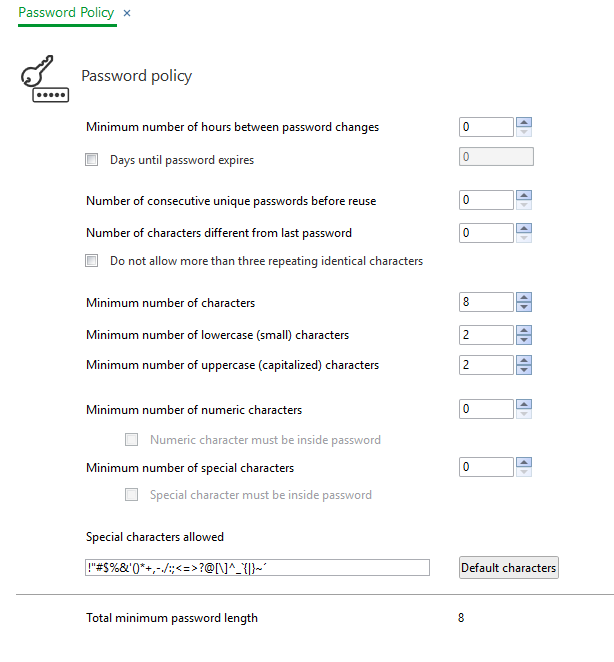
Component | Description |
Minimum number of hours between password changes | Enter the minimum number of hours required between password changes. To disable this feature, enter 0. In this case, users can change their passwords immediately. |
Days until password expires | Select to limit the days a password is in effect. You then enter the number of days before compulsory password change. The value of 0 specifies that the password does not expire. |
Number of consecutive unique passwords before reuse | Enter the number of passwords that have to be different before you can use the same password again. To disable this feature, enter 0. |
Number of characters different from last password | Enter the number of characters that must be different from the characters in the last password. To disable this feature, enter 0. |
Do not allow more than three repeating identical characters | Select to allow a maximum of 3 repeating characters. To disable this feature, enter 0. For more information, see Password Policy . |
Minimum number of characters | Enter the minimum number of characters allowed in a password. To disable this feature, enter 0. |
Minimum of lowercase (small) characters | Enter the minimum number of lowercase characters allowed in a password. To disable this feature, enter 0. |
Minimum number of uppercase (capitalized) characters | Enter the minimum numbers of uppercase characters allowed in a password. To disable this feature, enter 0. |
Minimum number of numeric characters | Enter the minimum of numeric characters allowed in a password. To disable this feature, enter 0. |
Numeric character must be inside password | Select to require that numeric characters cannot be the first or last character. |
Minimum number of special characters | Enter the minimum number of special characters allowed in a password. To disable this feature, enter 0. |
Special character must be inside password | Select to require that special characters cannot be the first or last character. |
Special characters allowed | Enter the special characters that are allowed in a password. For more information, see Password Policy . |
Default characters | Click to return to the default special characters. For more information, see Password Policy . |
Total minimum password length | Enter the minimum number of characters allowed in a password. To disable this feature, enter 0. |
 Password Policy
 Configuring the Password Policy
 using WebStation
Configuring the Password Policy
Configuring the Password Policy using WebStation